Safeguarding
North Beckton Primary School is committed to safeguarding and promoting the welfare of all its pupils. We believe that:
- All children have the right to be protected from harm.
- Children need to be safe and to feel safe in school.
- Children need support which matches their individual needs, including those who may have experienced abuse.
- All children have the right to speak freely and voice their values and beliefs.
- All children must be encouraged to respect each other’s values and support each other.
- All children have the right to be supported to meet their emotional and social needs as well as their educational needs – a happy, healthy, sociable child will achieve better educationally.
- Schools can and do contribute to the prevention of abuse, victimisation, bullying, exploitation, radicalisation, extreme behaviour, discriminatory views and risk-taking behaviour.
- All staff and visitors have an important role to play in safeguarding children and protecting them from abuse.
Safeguarding is defined as:
- Protecting children from maltreatment
- Preventing impairment of children's health or development
- Ensuring that children grow up in circumstances consistent with the provision of safe and effective care.
- Taking action to enable all children to have the best life chances
North Beckton Primary School will fulfil their local and national responsibilities as laid out in the following documents:
- Working together to safeguard children (DfE Dec 2023)
- Keeping Children Safe in Education: Statutory guidance for schools and colleges (Sept 2025)
- The Procedures of Newham Safeguarding Children Board
- The Children Act 2004
- The Education Act 2002
- Mental Health and Behaviour in Schools: Departmental Advice (DfE 2018)
- Prevent Duty 2023
The Team:
|
|
|
| Michelle Olorunfe Ojo - Deputy Headteacher |
Bal Kettory – |
| Designated Safeguarding/Child Protection/Pastoral Lead | Deputy Designated Safeguarding Lead |


Operation Encompass
What is it?
We are proud to be working with the London Metropolitan Police as part of  'Operation Encompass'. This is a programme which provides the trained staff within the school with appropriate information that will help us put in suitable and sensitive support to a child/children who may have witnessed or been involved in any domestic violence incidents at home.
What can the school do?
If needed, we can provide children with breakfast, give them school uniform or just a space to talk to teachers without fear.
Families who face possible difficulties can also be signposted to relevant outside agencies such as Victim Support or Social Care.
What is domestic violence?
The definition of Domestic Abuse is: any incident or pattern of incidents of controlling, coercive, threatening behaviour, violence or abuse between those aged 16 or over who are, or have been, intimate partners or family members, regardless of gender or sexuality. The abuse can encompass, but is not limited to: psychological, physical, sexual, financial, emotional
Controlling behaviour: Controlling behaviour is a range of acts designed to make a person subordinate and/or dependent by isolating them from sources of support, exploiting their resources and capacities for personal gain, depriving them of the means needed for independence, resistance and escape and regulating their everyday behaviour.
Coercive behaviour: Coercive behaviour is an act or a pattern of acts of assault, threats, humiliation and intimidation or other abuse that is used to harm, punish, or frighten their victim.
E-Safety
Online Safety: Advice for Parents and Carers
At North Beckton we teach children how to stay safe online as part of our computing and Time For Us curriculum. Most of their time online happens at home, though, so your support makes a big difference. This page brings together practical advice and trusted places to find out more.
If you’re worried about something your child has seen or experienced online, please speak to their class teacher or our Designated Safeguarding Lead Mrs Ojo. We’re always happy to help.
Five things you can do today
1. Turn on parental controls on every device.
Phones, tablets, games consoles and smart TVs all have built-in controls that can limit apps, purchases, screen time and content.
- Apple devices: Settings > Screen Time
- Android devices: the free Google Family Link app
- Xbox, PlayStation and Nintendo Switch: each has a free family or parental controls app
2. Switch on your broadband filters.
All major UK broadband providers (BT, Sky, Virgin Media, TalkTalk and others) offer free family filters. These cover every device connected to your home Wi-Fi. You can turn them on through your account online.
3. Use child-friendly search.
Set a child-safe search engine such as Swiggle as the home page for younger children. Turn on SafeSearch in Google and YouTube, or use the YouTube Kids app.
4. Check age ratings and age limits.
Most social media apps, including TikTok, Snapchat, Instagram, WhatsApp and Facebook, require users to be at least 13. Games carry PEGI age ratings (3, 7, 12, 16, 18). These ratings show the content of the game. They don’t cover chat with strangers or in-game spending.
5. Keep talking.
Filters and settings help, but they’re never perfect. The most effective protection is a child who knows they can tell you when something online upsets or confuses them, without worrying they’ll lose their device. Ask what they enjoy doing online, play games with them, and agree family rules together.
Simple family rules that work well
- Devices stay in shared family spaces, not bedrooms, especially overnight.
- Never share personal information such as your full name, school, address or photos in uniform.
- Only talk to people you know in real life.
- If something worries you, stop, don’t reply, and tell a grown-up.
- Ask before downloading a new app or game.
Where to find more help
Internet Matters – internetmatters.org
Step-by-step guides to setting up controls on almost any device, app or console, plus age-by-age advice.
Thinkuknow (CEOP / National Crime Agency) – thinkuknow.co.uk
Resources for parents and age-appropriate activities for children, including the Jessie & Friends animations for 4–7 year olds.
Childnet – childnet.com
Practical advice for parents on gaming, social media, screen time and online bullying.
UK Safer Internet Centre – saferinternet.org.uk
Guidance for families, and home of Safer Internet Day each February.
NSPCC – Online Safety – nspcc.org.uk
Advice on talking to children about online risks. Parents can also call the NSPCC helpline free on 0808 800 5000.
Reporting a concern
- If a child is in immediate danger, call 999.
- CEOP – Report concerns about online sexual abuse or someone acting inappropriately towards a child online: ceop.police.uk
- Report Remove – A free service from Childline and the Internet Watch Foundation. It helps young people get sexual images or videos of themselves removed from the internet: childline.org.uk
- Internet Watch Foundation – Report child sexual abuse images or videos online: iwf.org.uk
- Childline – Free, confidential support for children and young people, any time: 0800 1111 or childline.org.uk
- School – Please tell us too, so we can support your child in school.
Wider safeguarding
Information on other safeguarding topics, including child exploitation and female genital mutilation (FGM), can be found on our Safeguarding page [link]. The NSPCC FGM helpline is free and anonymous: 0800 028 3550
Mental Health Support
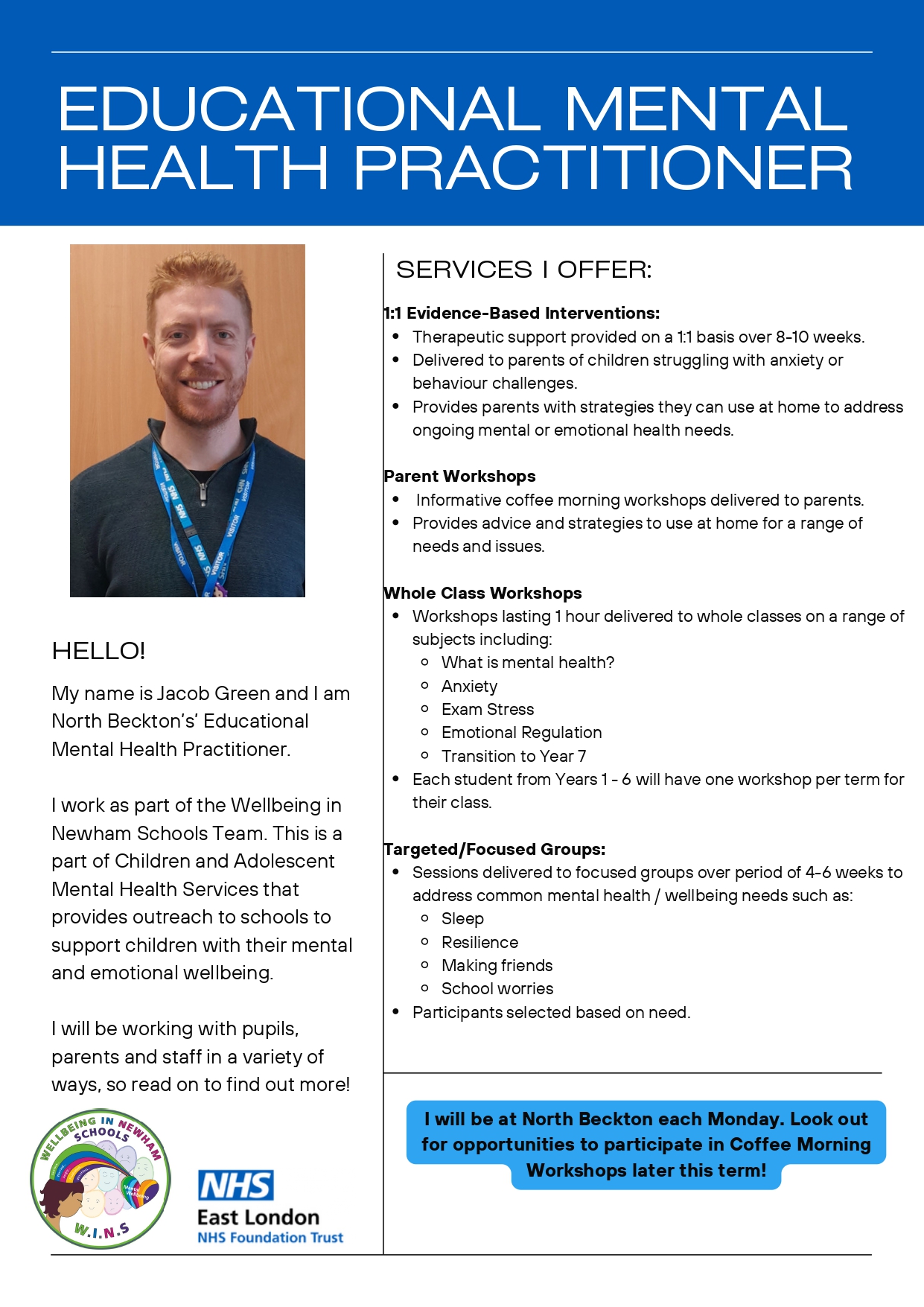
Click here to access free Mental Health Support for you or a member of your family. If you are concerned about the Mental Health of your child, speak to your child's class teacher or Mrs Ojo who will offer further advice. We also have our schools Educational Mental Health Practitioner who comes into school every Monday. Please stay tuned for upcoming coffee morning/training sessions.